
E-Rechnung Professionell
Batch, traffic lights, original, norm — buy once, no required subscription.
Discover the program






E-Rechnung Professionell
E-Rechnung Professionell
Batch assistant with traffic lights, PDF converter that keeps the original, EN 16931 offline. For offices and tax firms — stronger than a free one-file converter. Buy once, no subscription.
- Batch + traffic light
- Keep original PDF
- Fully offline
- No subscription
Batch · traffic lights · offline
Why E-Rechnung Professionell instead of a free converter?
For freelancers, offices and tax firms with ongoing need. Buy once, no subscription — stronger than “convert one file online”.
Batch with traffic lights
Five-step assistant: drop a folder, check, fix only gaps, write. Green / yellow / red before saving.
Keep the original
Same look, embed the e-invoice. Or redraw in the designer — including routing ID and cash discount.
Norm-compliant locally
EN 16931, BR-DE, PDF/A-3 on the computer. No upload of company data. Report as PDF.
The images show the current UI (assistant, converter, checker). Software: Windows and macOS, offline, no sign-in inside the program.
Single-seat licence for Windows and macOS
Check the batch, see the lights, keep the original
A complement, not a second set of accounts. Freelancers, offices and tax firms keep their invoicing program. Here the PDF becomes the e-invoice — with batch, traffic lights and offline check. Buy once, no subscription.
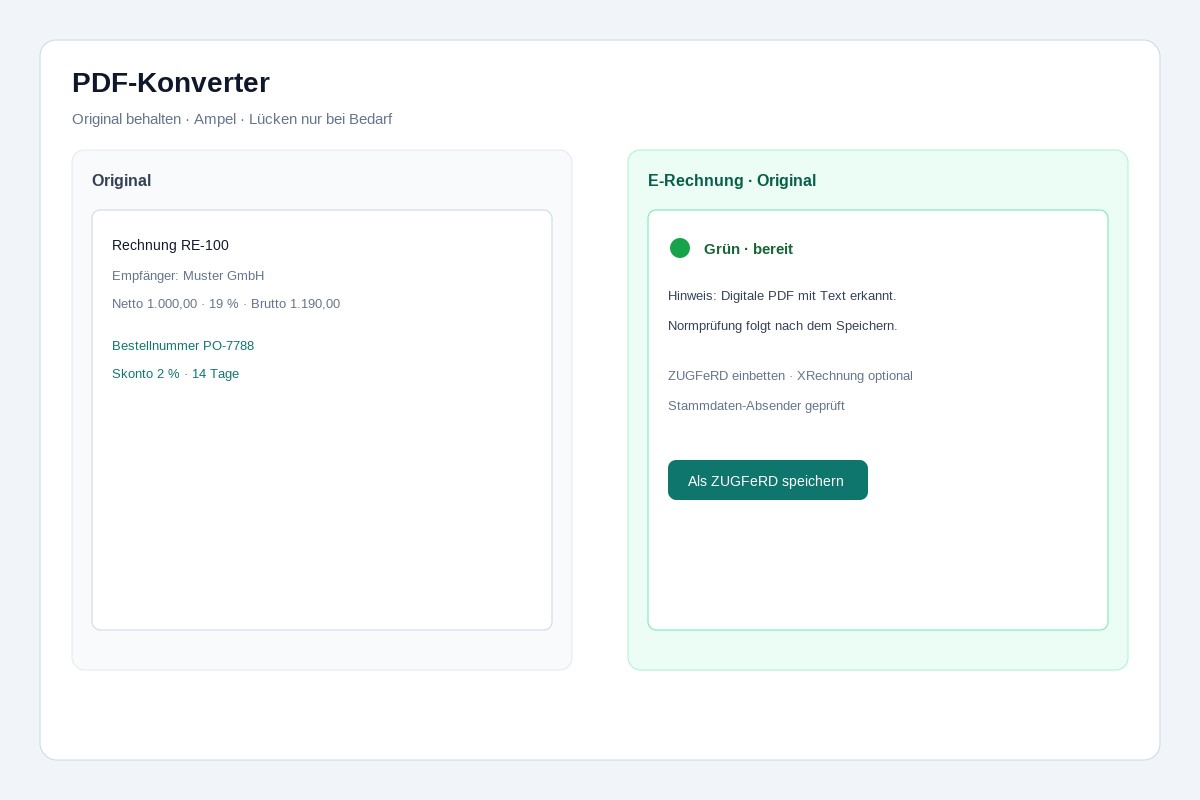
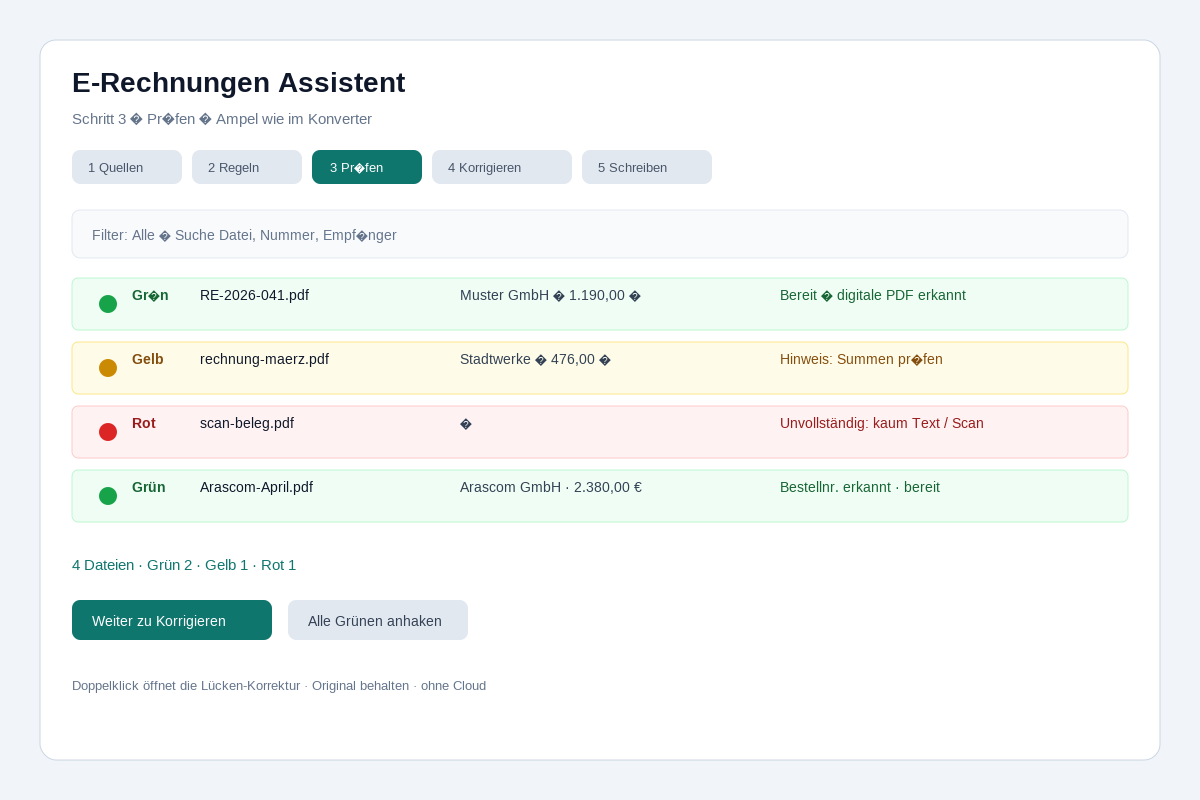
UI overview: five-step assistant with traffic lights, PDF converter keeping the original, sources/rules, and EN 16931 checker with pricing.
Why buy from us — not a free converter?
A free site often converts one file. Day-to-day work needs batches, traffic lights, original, master data and EN 16931 on your own PC. That is what assistant and converter deliver — no upload, no subscription.
Modules and strengths
Everything local on Windows and macOS. Every file you create can be checked against EN 16931 and BR-DE.
Five-step assistant
Sources → rules → check → fix → write. Filters and search, next gap, progress and cancel. Ideal for large batches with few clicks.
PDF converter
Original on the left, e-invoice on the right. Master-data sender, totals check, scan gate, order/routing/cash discount, lean gap correction.
Invoice designer
Layouts, logo, colours, routing ID, cash discount, live preview. Export as ZUGFeRD or XRechnung.
Viewer and checker
Open received ZUGFeRD/XRechnung so a person can read it. EN 16931, BR-DE, PDF/A-3 — report as PDF for the tax adviser.
Keep the original
Default: same look, only embed e-data. Optional redraw with a template.
Tax office / multi-client
Several clients locally on the PC. Several seats via licence/PC number — no server required.
Who the program is for
We do not replace bookkeeping. We complement it — for everyone who must create or check e-invoices regularly and with liability in mind.
Audience A
Freelancers, offices and SMEs
- Many outgoing PDFs: five-step assistant instead of file by file
- Keep the original PDF and embed e-data — layout stays
- Traffic lights before saving: green write, yellow review, red fix
- Recommended from €179 once · no subscription
Audience A+
Tax offices and associations
- Tax offices: several clients locally, separate master data
- Tax-office licence recommended €399 · several seats by PC number
- Tax-adviser export and validation report as PDF
- 100 % offline — client data does not leave the computer
Assistant overviewFour parts of the same program
Designer, converter, five-step assistant and checker — same engines, from one file to a whole folder.
Invoice designer
Designer ↗PDF converter
Converter ↗E-invoice assistant
Batch ↗Checker
Check ↗
Assistant: from folder to checked e-invoice
Five steps — large batches with few clicks, all on your own computer.
- 01
1 · Sources
Drop PDFs or pick a folder. Optional subfolders.
- 02
2 · Rules
Destination folder, keep original (default), mapping only if needed.
- 03
3 · Check
Batch scan: lights, master data, totals, scan hint.
- 04
4 · Fix
Only red/yellow — double-click or “Next gap”.
- 05
5 · Write
Write green, progress, norm check, journal.
Prices from 179 €
Edizione digitale · utilizzabile senza abbonamento
Recommended: firm/single seat €179, tax office/multi-client €399 (once, no subscription). Current shop price: Windows and macOS. USB/KeyCard same licence (+ shipping). Marketplaces typically €149 list. Second computer = own seat.
Acquista l’edizione digitale
Ordina nel negozio e completa il pagamento.
Ricevi la licenza
Il codice di licenza personale viene inviato via e-mail dopo la conferma del pagamento.
Apri e attiva
Install the program for Windows or macOS and enter the licence code on this one computer. It is a single-seat licence. There is no sign-in inside the program.
E-invoice duty 2027 / 2028 — and strong reasons to buy
Receiving becomes mandatory, sending follows. 179 € is the current one-time shop price of the single-seat licence. Why buying from us pays off:
Batch instead of one file
Free converters often make one file. The assistant makes the folder with traffic lights.
Keep the original
Look stays, e-invoice is embedded — important for customers and corporate design.
Norm-compliant offline
EN 16931 and BR-DE on the PC. No upload of client data.
Pay once
No required subscription. Tax-office upgrade when several clients and seats are needed.
Same licence, three ways to receive it
Download · USB stick · KeyCard
The program on the computer. The code on the card.
Download, USB stick and KeyCard are the same single-seat licence for one workplace. KeyCard buyers download the program after the card arrives and enter the code on this one computer. The USB stick carries the program and a short guide.
- KeyCardA single-seat licence. Scratch the code free and enter it on this one computer. The download stays at /download.
- USB stickA single-seat licence for one workplace, with the program and a printed short guide.
- Validation reportEN 16931, BR-DE and PDF/A-3, saved as a PDF for the accounts.
E-RECHNUNG
KeyCard
Single-seat licence, one workplace
e-rechnung-professionell.de/download
The KeyCard download path for buyers stays in the account. Postage for the card inside Germany is included; the USB stick is shipped separately.
Four terms before you buy
Short explanations — the UI images above show assistant, converter, sources and checker.
- 01
ZUGFeRD
PDF with embedded XML. People read the page, software the data. PDF/A-3.
- 02
XRechnung
XML under EN 16931 for authorities — routing ID when required.
- 03
Traffic light
Green ready, yellow review, red fix — before anything is written.
- 04
KeyCard
Licence code under the scratch panel. Unlock software at /download on one computer.
Questions
Batch, free converters, prices, offline, KeyCard.
How does this differ from free online converters?
Free sites often suit a single file. E-Rechnung Professionell is for day-to-day work: batch assistant with traffic lights, keep original, master data, totals check and EN 16931 locally — no upload.
What is a ZUGFeRD invoice?
An ordinary PDF that contains the machine-readable invoice. The program writes and checks it on your computer.
What is an XRechnung?
The XML invoice under EN 16931 for German public authorities. The routing ID can be shown in the designer. More is on FAQ.
Is this a subscription?
No. Recommended €179 firm / €399 tax office once. The shop shows the current price 179 €. A second computer needs its own seat. More is on shop.
Does this replace the accounts?
No. It complements existing programs: the PDF becomes the e-invoice, received files are checked.
Are invoices uploaded?
No. 100 % offline. No cloud upload, no sign-in inside the application. More is on privacy.
Is there multi-client for tax advisers?
Yes: tax-office mode with several clients locally on the PC, plus a tax-office licence for several seats. No server required.
What applies from 2027 and 2028?
Businesses must be able to receive e-invoices. Mandatory sending follows. ZUGFeRD and XRechnung are created locally.
What does the program check?
EN 16931, BR-DE and, for ZUGFeRD, PDF/A-3. You save the report as a PDF.